Fast on Windows
Built with Tauri v2, Rust, and WebView2 (not Electron), so it stays thin on RAM and CPU.
Windows game menu for cafés and LAN shops
A lightweight launcher that keeps stations fast, branded, and easy to run from a shared folder.
Browse the library and Admin in your browser — no install. Launching games still needs the Windows app. License is ₱50 per machine. Stable download: svenprotech.pages.dev/get.html · facebook.com/svenprotech
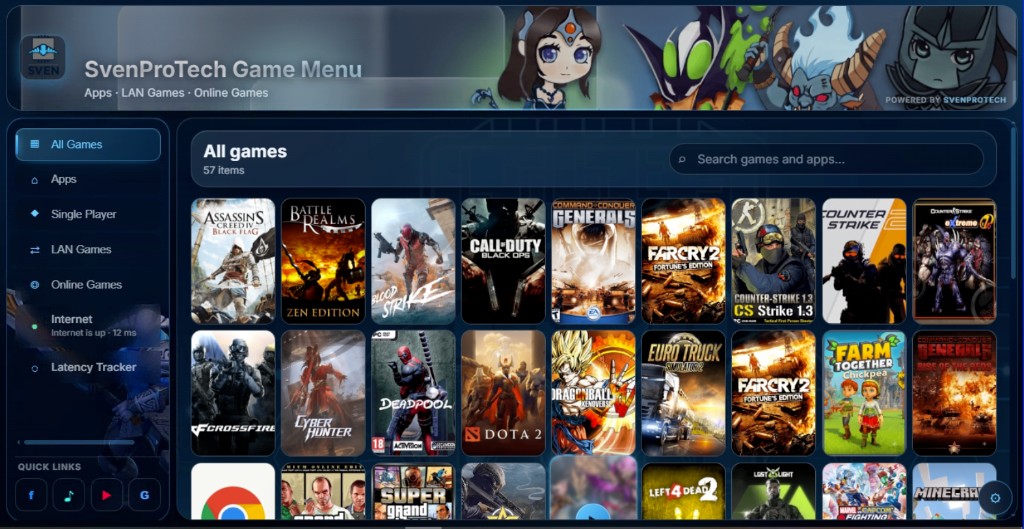
Open a live demo of the real Game Menu UI: sidebar categories, search, game grid, custom cursors, announcement rail, and Admin (any password). Mute still works as a UI control — music playback and real game launching stay in the Windows app.
Changes in the demo are not saved. When you’re ready for your shop, download the build and license each machine for ₱50.
One license unlocks one PC — so a 20-station shop pays for 20 machines. That’s it: ₱50 each, no shop-wide package markup.
Competitors often charge around ₱1,200–₱1,400. I priced this for every internet shop that just needs a solid game menu without burning the budget.
Still looking for a few beta testers: each gets 10 free lifetime licenses. Message SvenProTech on Facebook if you want a spot or to buy keys.
Permanent download link (bookmark this): svenprotech.pages.dev/get.html · Contact only through our Facebook page: facebook.com/svenprotech
A lightweight Windows game menu for PC cafés, LAN shops, and gaming stations. Customers browse Apps, LAN Games, and Online Games in a branded glass UI, then launch local .exe files directly.
Password-protected Admin lets you brand every station: logo, banner, titles, wallpaper, categories, launcher tiles, install paths, and more. One shared game list can still work when PCs use different drive letters.
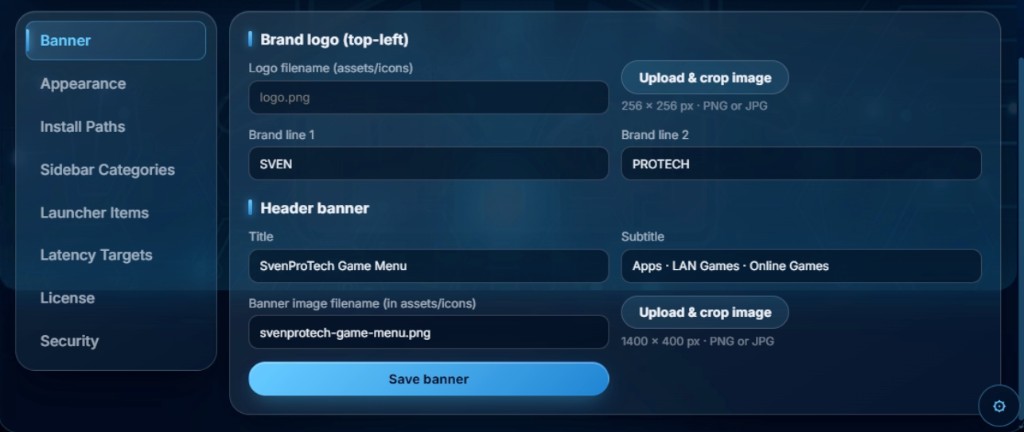
Open Admin on a station, then set install roots once, add each title under Launcher Items, attach a cropped PC cover, and drag rows into your preferred order.
Go to Admin → Install Paths and set the base folders for Apps, LAN Games,
and Online Games on that PC (for example C:\lan games). Later, each launcher
item picks one of these roots, then you only store the relative folder and executable name.
Under Sidebar Categories, create labels like Apps, LAN Games, or Online Games, set a slug and icon, and enable them in the sidebar. Categories are the filters players tap to browse.
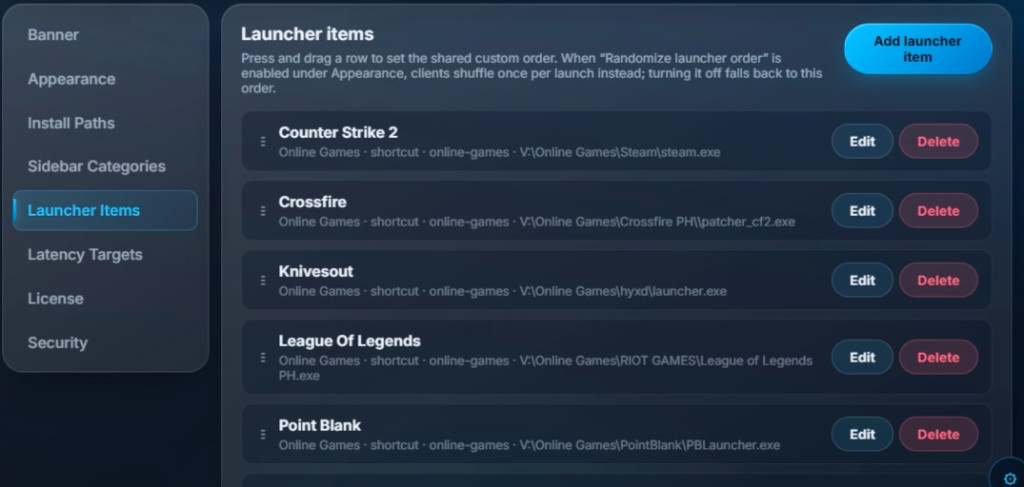
Open Launcher Items and click Add launcher item. Choose category tags, enter the game name, pick the launch type (desktop shortcut / .exe), select an installation path root, then fill working directory and target executable. Keep Enabled in launcher on, then save.
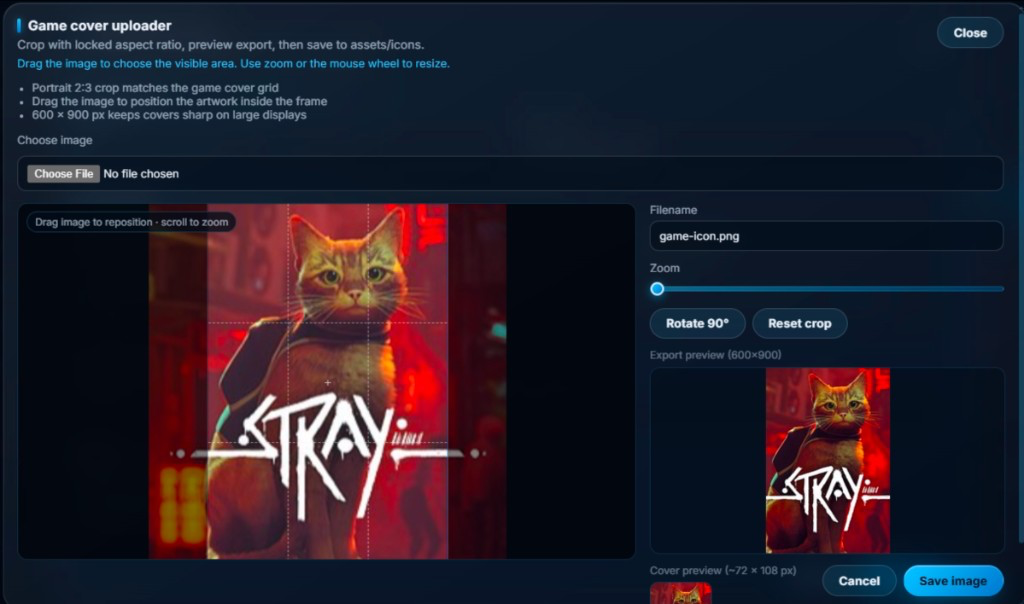
In the item editor, open Artwork & options and use Upload & crop image — do not rely on pasting a random filename alone. That button opens the Game cover uploader:
assets/icons and linked to that game.
Tip: start from a tall poster or box art. The built-in cropper locks aspect ratio so every tile looks consistent — no more stretched or mismatched covers.
Back on the Launcher Items list, grab the handle on the left of a row and press and drag to set the shared custom order. That order is what stations use by default. If you turn on Randomize launcher order under Appearance, clients shuffle once per launch instead; turn randomize off to fall back to this drag order.
Think of one permanent folder for your café. The
data folder inside it is your config and covers. New versions only replace the
app files — you keep the same folder and the same
data.
Always download updates from the same link: svenprotech.pages.dev/get.html
Do not delete the folder where the menu already runs. That folder should look like this:
Your cafe folder\          ← keep this folder forever
  SvenProTech Game Menu.exe
  (other app files)
  data\                    ← keep this whole folder
    config.json            ← your games & settings
    config.json.bak
    assets\
      icons\               ← your PC covers & branding
      music\               ← background music tracks
Open
svenprotech.pages.dev/get.html
(same link every time). That opens the shared
Google Drive folder.
Download the new svenprotech-game-menu.exe (or the latest app files) into a
temporary folder — not on top of your live café folder.
Copy the new .exe (and any new app files) into your existing café folder and
overwrite the old executable. Leave your local data\ alone — do not replace it
with a blank data from Drive unless you intentionally want a fresh setup.
SvenProTech Game Menu.exe / svenprotech-game-menu.exedata\ folder exactly as it is
Your games and covers stay because they live in data\, not inside the .exe. The
Drive folder link never changes — new updates replace files inside that same folder.
Run the .exe from the same café folder. Your games, covers, and Admin settings should still
be there. On a network share, do the same once on the share so every station picks up the
new app with the shared data.
Copy data\config.json.bak over data\config.json, then relaunch.
Before big updates, copy the whole data folder to a USB or another drive as a
backup.
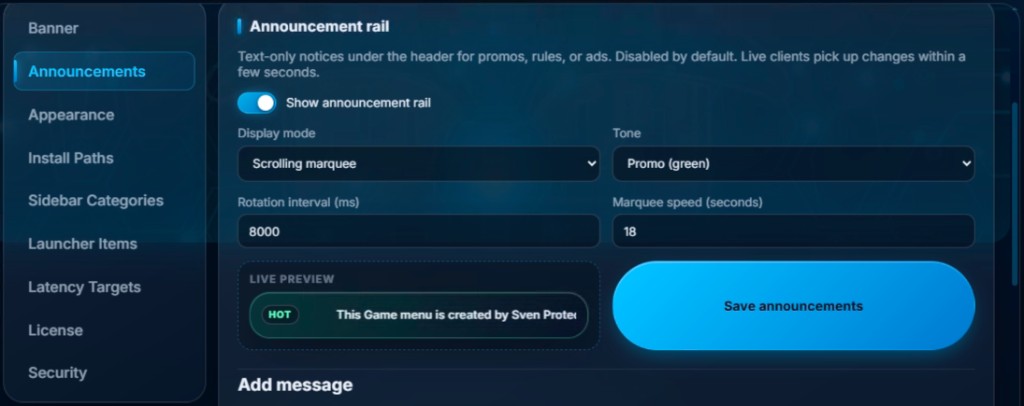
Put house rules, promos, or ads in a text-only strip under the header. Tunable display mode and tone from Admin, with a live preview before you save. Disabled by default — turn it on when you are ready. Live clients pick up changes within a few seconds from the shared config.
Toggle Show announcement rail, then choose how messages appear:
Set a tone (Promo green, Info, or Urgent), tune marquee speed or rotation interval, and use the live preview to confirm the look.
Under Add message, write your text, optional badge label (for example HOT or RULES), enable the row, and save. Stack several lines for promos, points reminders, or café rules — players see them under the header while they browse.
When the internet drops, the menu can force an urgent offline notice on this same rail (even if announcements were turned off) so customers know Online Games are unavailable.

The menu can play looping café ambience while customers browse. On each startup it picks a random track from your music folder. Music is on by default, and it mutes automatically when the window is minimized or another app is in front — then resumes when the menu is focused again.
Put audio files in
data\assets\music\
next to the .exe. Supported formats:
mp3, ogg, wav, m4a, aac, flac. Default tracks ship with the app and are
copied into this folder on first launch — you can delete or replace them anytime.
Open Admin → Appearance → Background music:
Saving Appearance applies enable/volume immediately. Dropping files into
data\assets\music is enough too — restart the app (or re-open the menu) so the
new files are picked for the next random start.
Music stays silent while a game or another window is in front, so it does not fight in-game audio. Bring the launcher back to the foreground and the track continues from where it left off.
Give the menu a themed mouse cursor that only appears inside the Game Menu window — Windows itself and other apps keep the normal system cursor. Default pack is Wrath of Ka.
Open Admin → Appearance → Custom cursor and pick from the dropdown:
Save Appearance to apply. Interactive elements (buttons, tiles, links) use the pack’s pointer frame; disabled controls use the “not allowed” frame.
Leaving the menu (or minimizing it) returns to the normal desktop cursor. No system install or registry change is required.
Built with Tauri v2, Rust, and WebView2 (not Electron), so it stays thin on RAM and CPU.
Password-protected Admin area to shape the whole experience:
Text-only notices under the header for promos, rules, or ads. Choose scrolling marquee, rotate, or static mode, pick a tone, and preview live in Admin before saving. Off by default.
Pick Wrath of Ka, Diretide 2020, Acid Hydra, or the system cursor in Admin. Themes stay inside the menu window and never change the Windows desktop pointer.
Random track each launch from data\assets\music. On by default; mutes when the
menu loses focus. Configure volume and tracks under Admin → Appearance.
Toggle “Randomize launcher order on each app launch.” Every open shuffles the tiles so stations don't all show the same games on top, and players discover more of your library.
Drop the app folder on a network drive (D:\, V:\, or a game server share). Clients run the .exe with no complicated install.
Live ping graphs for ICMP and TCP, so staff can spot internet issues quickly.
When the connection drops, Online Games tiles become unclickable and the announcement rail shows a clear offline message — even if announcements were turned off. Runs in the background so app startup stays fast (on by default; can be disabled in Admin).
Instant access to sites like Facebook, TikTok, YouTube, and Chrome.
Easy backup for safer recovery if something goes wrong.
Major features and fixes as we ship them. Current build: v0.1.9.
data\assets\music on each launch (on by default); mutes when the window is
unfocused or minimized.
Try the live browser demo, then download the Windows build and message SvenProTech for licenses at ₱50 per machine. Beta spots with free lifetime keys are still limited.